
In June 2026, many of the currently used Secure Boot certificates reach their expiration date and this can quickly become a problem for companies. Without timely updates, companies risk that security-relevant tests on systems will fail and that the door will be open for cyber attacks during the boot process. Accordingly, there is currently increasing pressure to address the issue and to plan necessary measures at an early stage.
The most important things in brief
- Secure boot certificates expire in 2026: Without an update, devices gradually lose important protection mechanisms in the boot process
- Centralized control is crucial: About Microsoft Intune or Windows Autopatch, updates can be rolled out and monitored efficiently
- Patch Management is extended: In addition to classic updates, firmware, boot loaders and certificates must also be actively considered
1 What are Secure Boot Certificates?
Secure Boot Certificates are digital keys that are stored in a computer's firmware system (usually UEFI) and ensure that only trustworthy software runs when booted. They are part of the Secure Boot Security Feature, which checks whether the Boot Loader and Operating System have valid signatures. Only software whose certificates are stored in the permitted database may be loaded — everything else is consistently blocked.
When started, the system checks cryptographically signed software for trustworthy sources: Manufacturers and operating system providers such as Microsoft have signed their components accordingly. The system compares these signatures with the stored keys and thus decides whether to continue the start. As a result, Secure Boot effectively protects against attacks such as boot kits or rootkits, which could otherwise establish themselves before the actual operating system.
2 Intune guide: Update secure boot certificates
Create configuration profile
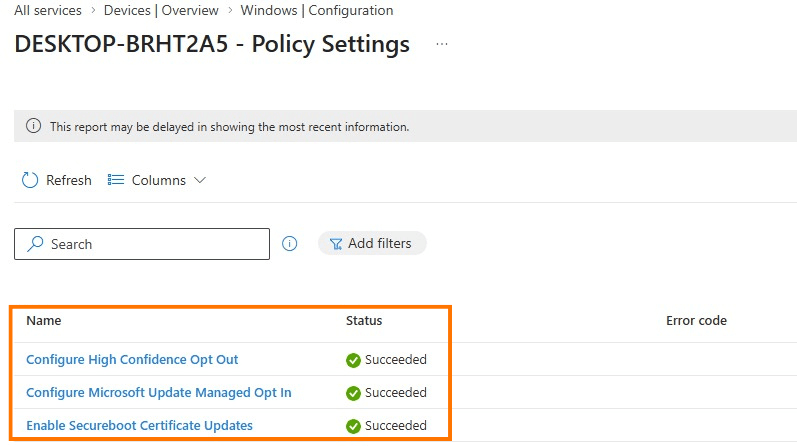
The necessary settings can be distributed centrally via Microsoft Intune Depict. For this purpose, a new profile is created in the devices > Configuration area based on Settings Catalogs created. Within the settings, you can filter specifically for “Secure Boot” in order to select the relevant options — in particular control over Microsoft updates and activation of the certificate update. After configuration, it is assigned to the appropriate device groups.
Understand the status of the policy
As soon as the devices have been synchronized, initial feedback on the rollout is available. The deployment status can be viewed directly in the respective policy. In this context, the error code occasionally occurs 65000 , which is already documented as known behavior. The cause is usually inconsistencies in client or license status, which can usually be resolved by re-registering the device.
Device-level testing
In addition to the central view, it is recommended to take a look at the individual systems. Appropriate registry paths make it possible to see whether updates have been prepared or have already been applied. In addition, the Windows Event Logs provide further information about progress or potential problems during the update.
Secure boot status report (Windows Auto Patch)
In addition to policy distribution, Microsoft Intune, combined with Windows Autopatch, offers a preconfigured report that makes the current status of Secure Boot in the environment transparent. The so-called Secure Boot status report provides a device-based overview and helps to identify potential gaps at an early stage.
The focus is on three key questions: Is Secure Boot activated on the device? Are the necessary certificates up to date? And where is there still a need for updates? Devices without Secure Boot activated are also displayed, but they are not relevant in the context of certificate updates.
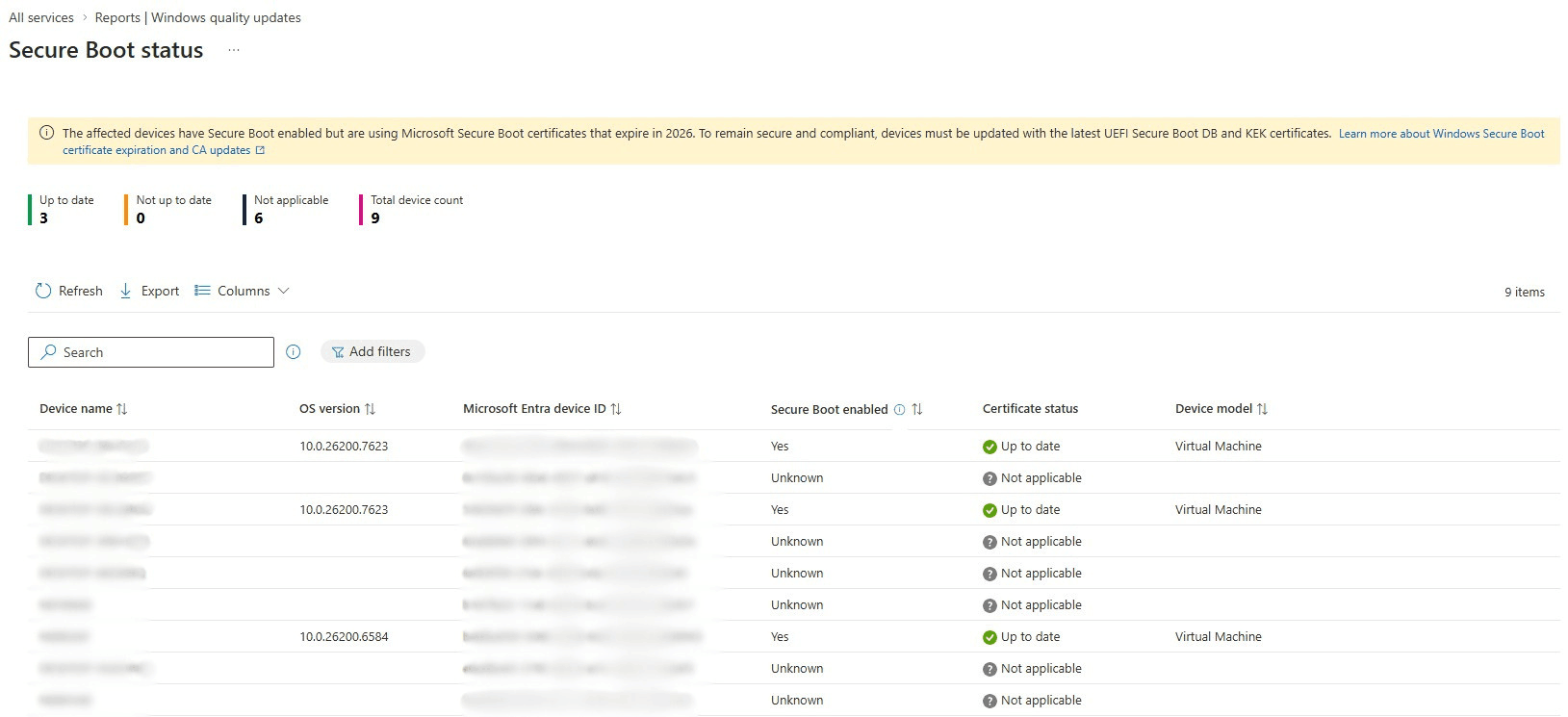
The report therefore enables rapid prioritization: Systems that are already “up to date” do not require any further measures, while outdated certificates can be specifically adjusted. This allows you to efficiently monitor the progress of Secure Boot updates and reduce the risk of potential problems in advance.
3 Risks of Secure Boot Certificates Expiring
Action must be taken by June 2026: Many secure boot certificates expire, and without timely updates, devices can become more vulnerable to boot process attacks. Although the systems continue to boot, they lose protection features for the very early start, such as new security mechanisms for the boot loader or protection against boot level malware.
For Companies, This Means That a Controlled patch management The decisive factor is: Only devices with current certificates will continue to receive all security updates and remain compatible with features that rely on Secure Boot, such as BitLocker or certain third-party boot loaders. Proactive monitoring via Intune or Windows Autopatch helps to roll out certificate updates in a targeted manner and minimize security risks.
4 Secure boot report for SCCM
There are also suitable evaluation options for environments without Microsoft Intune. Patch My PC provides within Advanced Insights for Configuration Manager Your own secure boot dashboard is ready. This helps organizations keep an eye on the status of their devices with regard to upcoming changes related to firmware, secure platform and certificate updates.
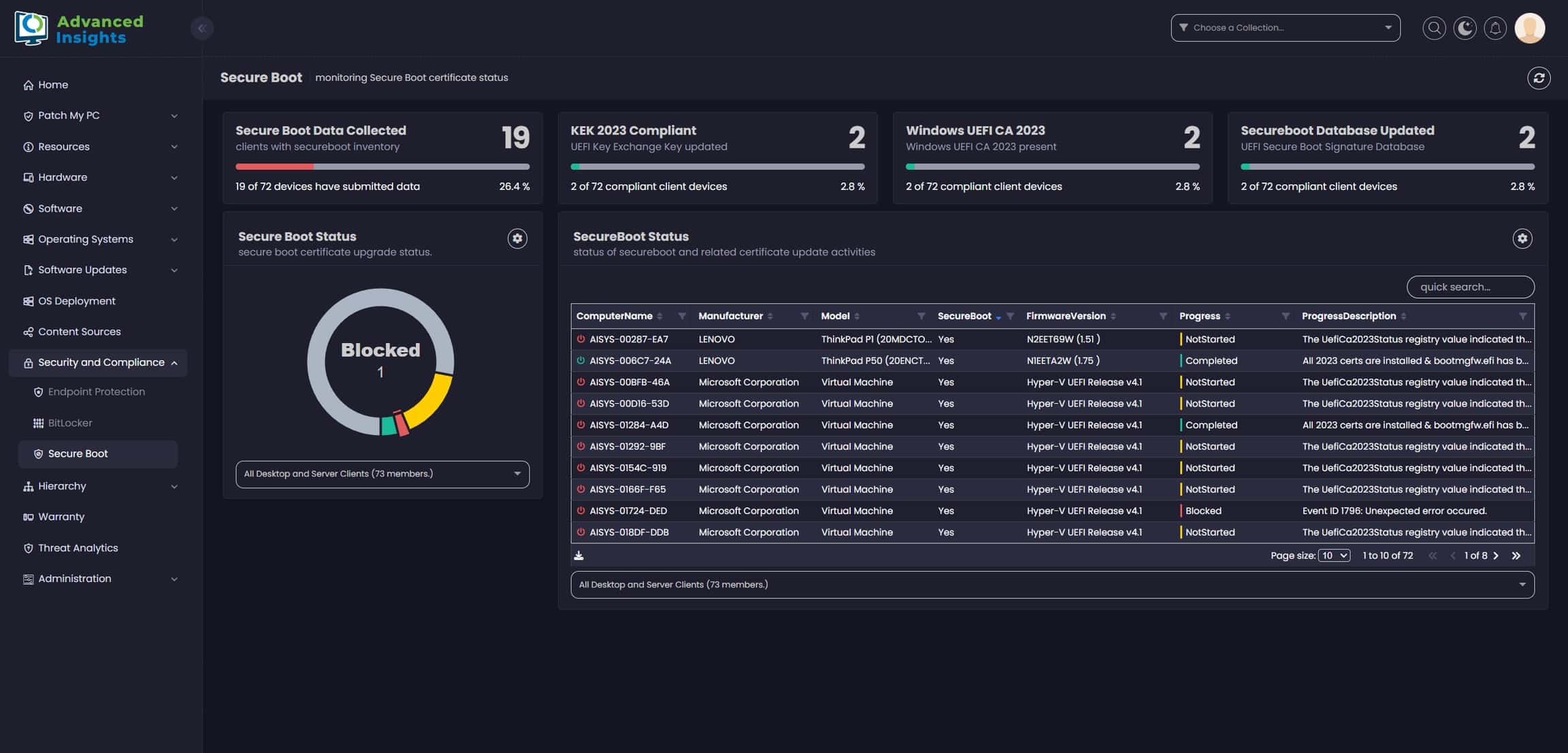
The report shows at a glance where individual systems are in the update process — from required firmware adjustments to platform updates to the installation of new certificates and database updates. As a result, even pure SCCM/MECM-Environments have a central overview and can prioritize necessary measures in a targeted manner.
5 Conclusion
Companies should urgently use the remaining time until June 2026 to update the secure boot certificates on their devices. Anyone who rolls out the updates centrally via Intune not only secures the trustworthy boot process, but also ensures that new protective measures and security updates remain fully effective.
This scenario also makes it clear that effective patch management today goes far beyond operating system updates. Firmware, boot loaders and certificate chains must also be included in the planning. Anyone who acts proactively here minimizes risks, maintains control over the device fleet and can smoothly introduce new security mechanisms.

Since 2011, Thore has focused exclusively on endpoint management and endpoint security topics. Initially focused on software packaging and software distribution with Microsoft MECM/SCCM and Ivanti DSM, he is now a sought-after interlocutor when it comes to unified endpoint management, system hardening, patch management and endpoint protection. The focus is in particular on the Microsoft technologies Intune, Configuration Manager, Entra and Defender. Thore is co-founder of the “Endpoint Management” expert group at IAMCP e.V.


Years of Experience
Managed Endpoints